Every business customer you sign up gets a portal account. From there they can create shipments, schedule pickups, track packages, view invoices, and pay online - without ever asking your team. The phone gets quieter and your operators get back to actual operations.

The portal lives on your subdomain (or your own custom domain on enterprise plans), shows your logo, and uses your color palette. Customers don't see a third-party brand. As far as they can tell, you built it.

A Site That Looks Like Yours, Not Ours

The portal lives inside a full public website you control - homepage, services, pricing, about, contact, FAQ, anything you want to add. Pick a template from our library and tweak the colours, fonts, and copy, or bring your own design and we'll wrap it around the portal so customers move from marketing pages to their workspace without ever leaving your brand.

Pages, menus, blog posts, and content are edited from the lcpanel control panel. Add a new page, reorder the menu, swap a hero image - no developer needed for routine changes. If you want a fully custom build, we offer that as a one-off design service.

Embeddable Widgets

Drop a tracking lookup, rate-quote calculator, or login form onto any page - your CMS, a marketing site, even a customer's own site - with a snippet of HTML. Pick the accent colour from the admin, copy the iframe code, paste it in. Customers get instant tracking and quotes without bouncing to a separate domain.

REST API for the Rest

Everything the portal does is also a documented API call. If you'd rather build your own website, mobile app, or internal tool and use Live Courier purely as the backend, you can. Auth, rates, shipments, tracking, invoices, pickups, webhooks - all there. See the developer docs.
Their Workspace, Your Brand

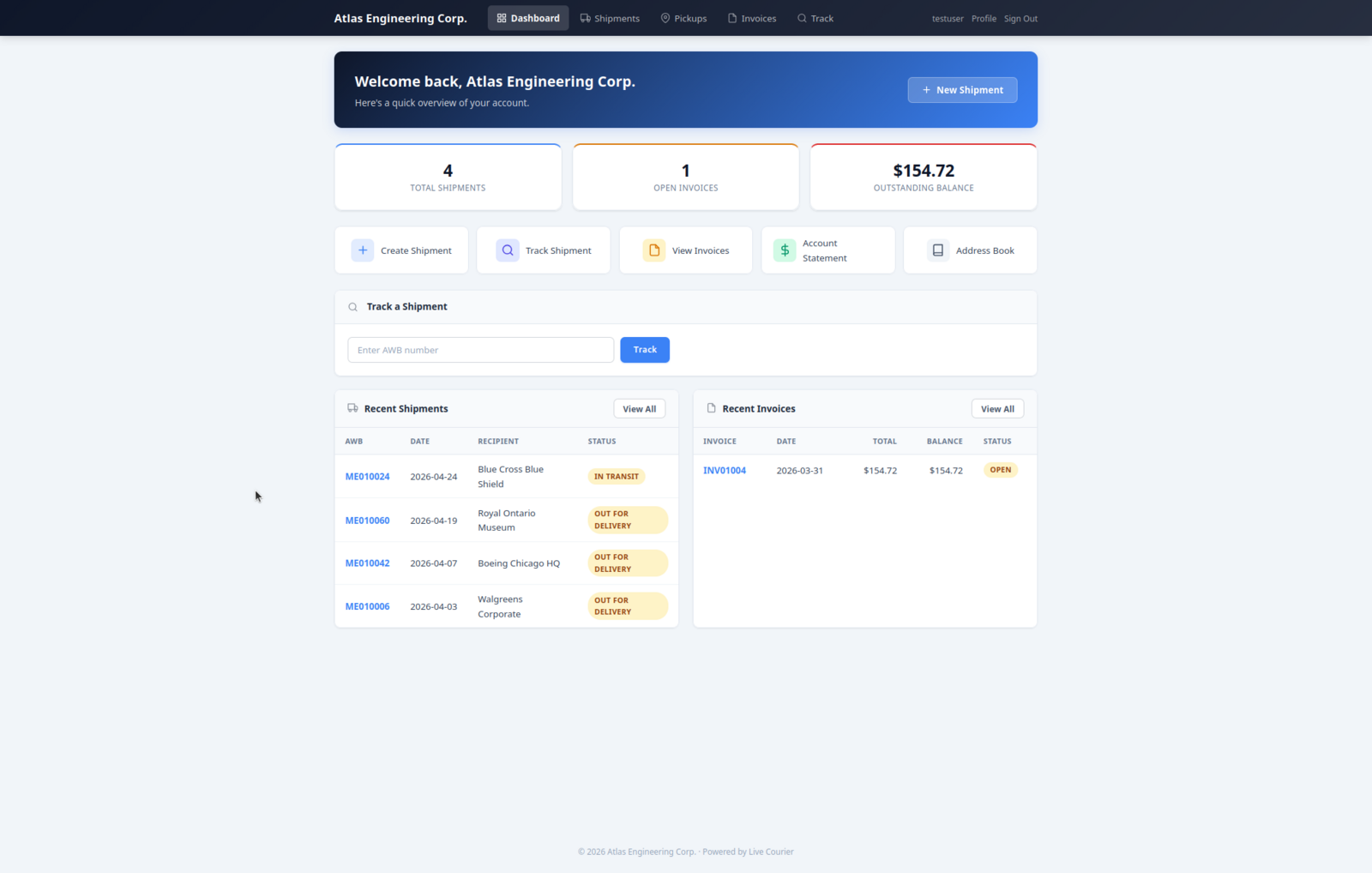
Each customer logs in and sees a personalised dashboard with their shipment count, open invoices, outstanding balance, and recent activity. One click takes them to the next thing they need.

  • Quick stats - shipments, open invoices, balance owed - at the top of every visit.
  • Action shortcuts - create, track, view invoices, account statement, address book - one click each.
  • Recent shipments & invoices - the two things 95% of portal sessions are about.
  • Track-a-shipment - same workspace, no separate page to remember.
Customer portal dashboard with stats, quick actions, recent shipments and invoices

Create Shipments Without a Phone Call

The customer fills in pickup and delivery details, gets a list of available services with live prices, picks one, reviews, and confirms. Three steps, no human in the loop on your side.

  1. Sender + recipient + package details. Recipient lookup pulls from the customer's address book.
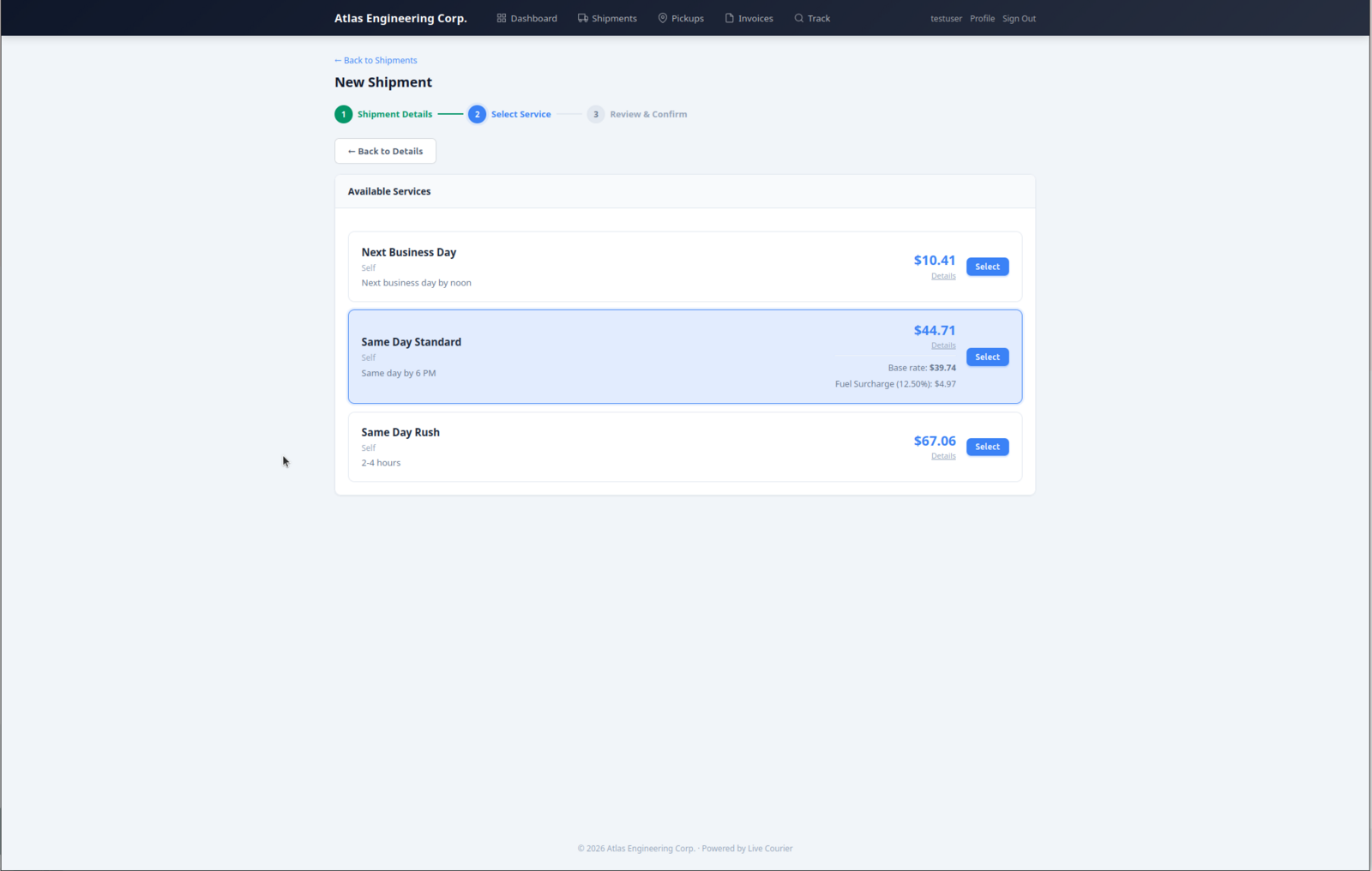
  2. "Get rates" returns every service the customer is eligible for, with their negotiated prices, transit times, and a fuel-surcharge breakdown.
  3. Pick a service, review the summary, optionally schedule a pickup or notify the recipient, and create. AWB is generated immediately.

Prepay accounts pay by card at this step. Credit accounts go straight through to the AWB.

Shipment wizard step 2: available services with prices and details

Review, Confirm, Done

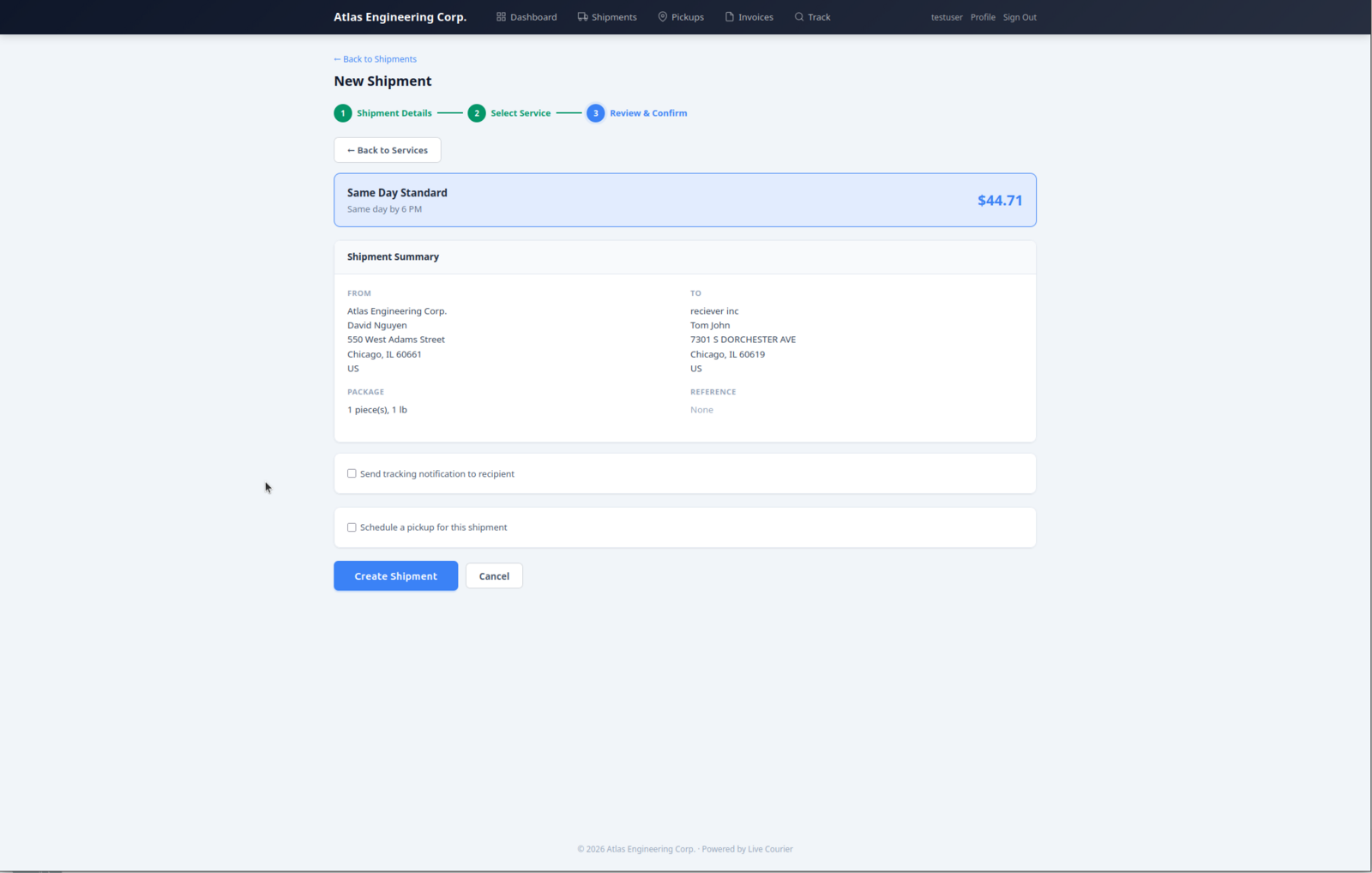
Step 3 is a single-screen recap: selected service, from/to, package and reference, plus two opt-in checkboxes - notify the recipient by email, or schedule a pickup at the sender address. Customers don't have to leave to do either.

  • Pickup detection - if you already have a pickup scheduled at that sender address today, the system says so and skips the form.
  • Recipient notification - sends a tracking email with your branding, no extra step.
  • Address book save - one checkbox to remember the recipient for next time.
Shipment wizard step 3: review, confirm, optional pickup and recipient notification

Every Shipment, Every Detail

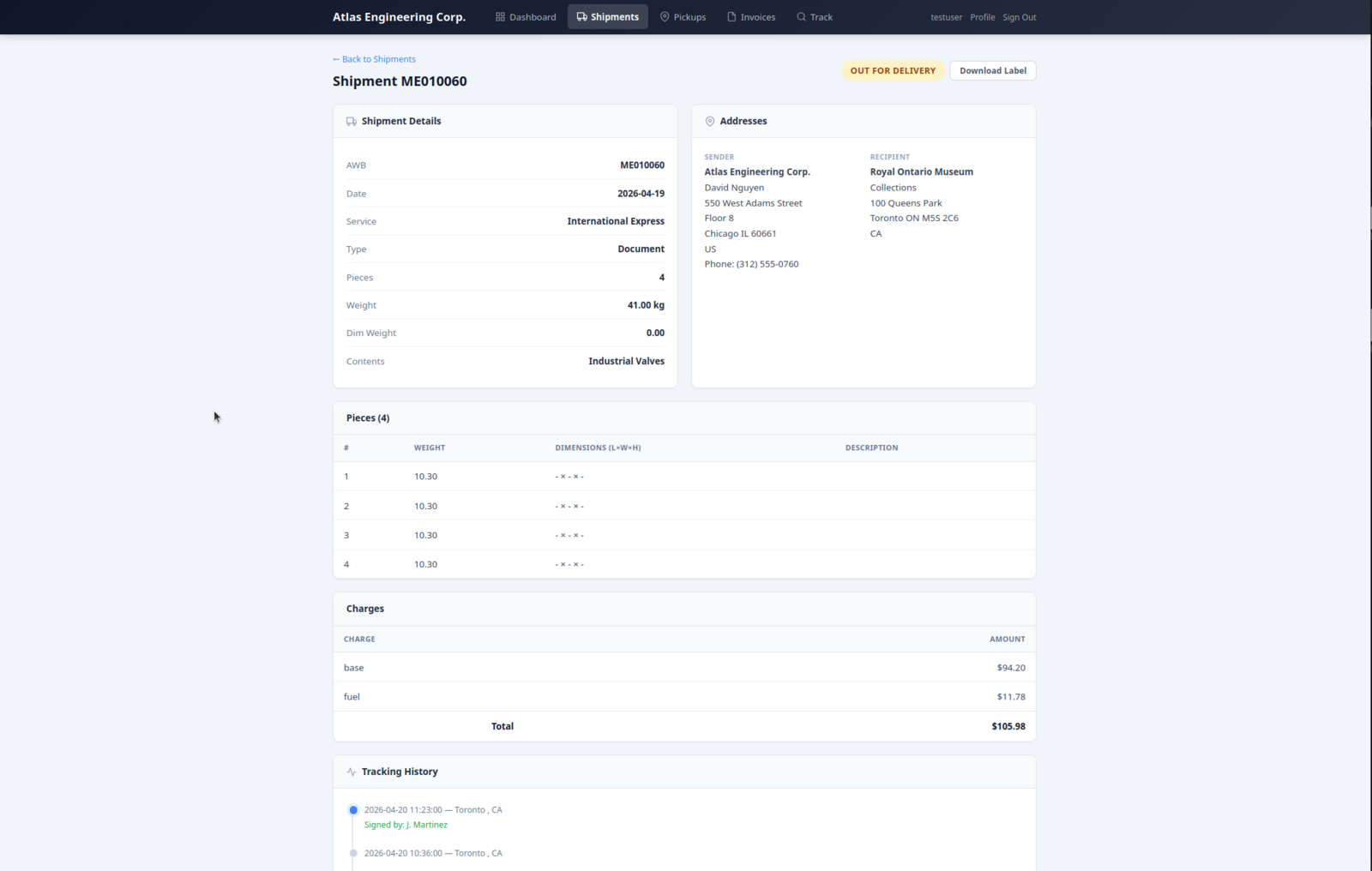
From the dashboard or the shipments list, the customer drills into any AWB and sees everything: addresses, weights and dimensions per piece, charge breakdown, and the live tracking timeline. Plus a download-label button for the ones they create themselves.

  • Multi-piece breakdown - weight and dimensions for every piece, not just the total.
  • Charges - itemised: base, fuel, surcharges. No "what is this for" emails.
  • Tracking history - live, with timestamps, locations, and signature/POD when delivered.
  • Download label - PDF waybill any time, useful for reprints.
Shipment detail page with addresses, pieces, charges and tracking history

Invoices and Balance, Online

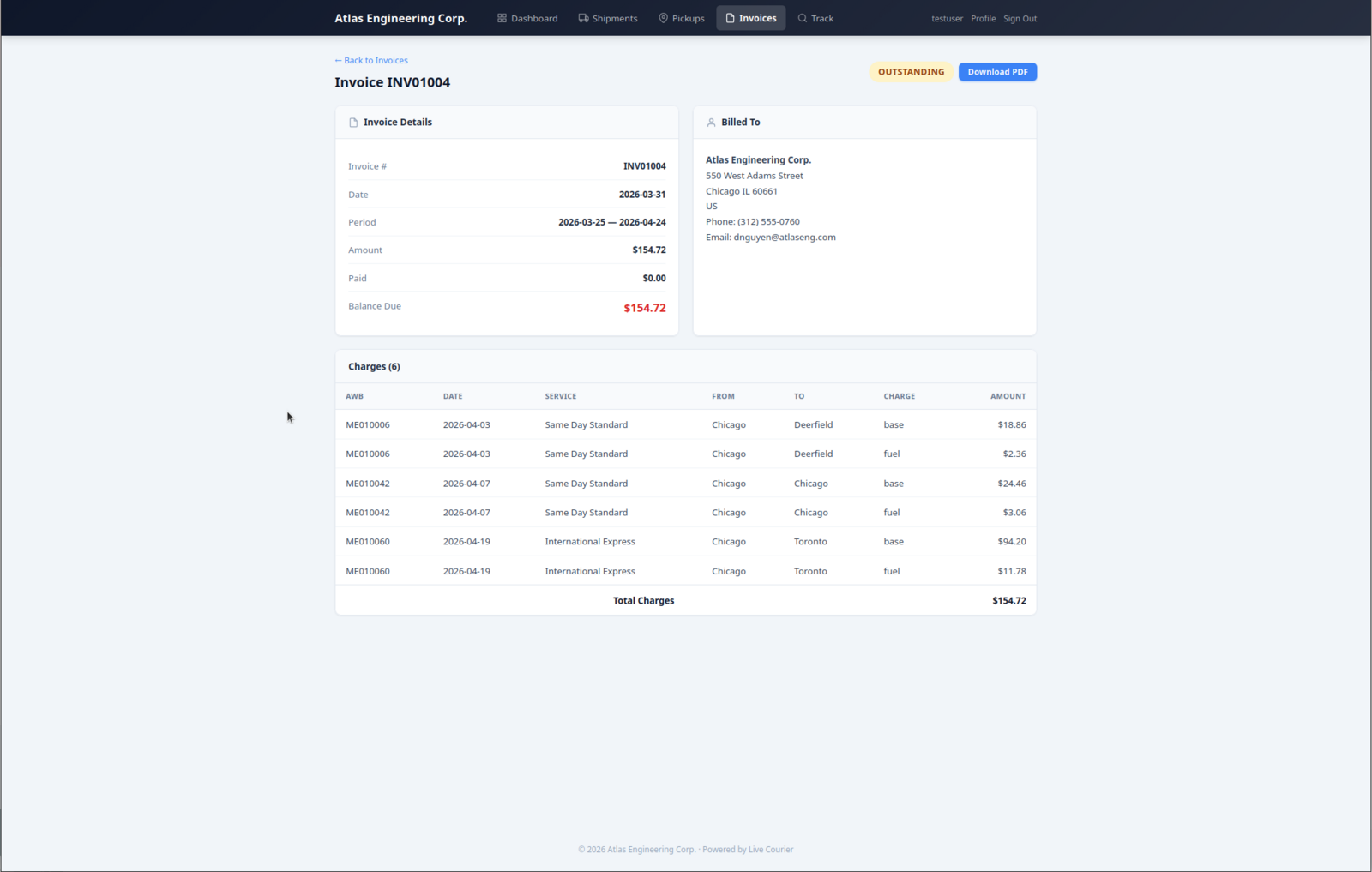
Credit-account customers see every invoice as soon as you generate it, with full line-by-line charges. Outstanding balance is on the dashboard, so there's no excuse for "I didn't know I owed you".

  • Charge detail - AWB, date, route, service, charge type, amount. Same data your accounting team has.
  • Download PDF - on every invoice, formatted for your customer's bookkeeper.
  • Account statement - quick action from the dashboard, all invoices in one view.
  • Pay online - card payments through Stripe, posted back to the invoice automatically (when card payments are enabled).
Invoice detail with billed-to, balance due, and line-by-line charges

What's Behind It

The pieces that make a portal feel like a product, not a tacked-on add-on.

Related

Give Your Customers a Portal That Looks Like Yours

Start a free trial and see what self-service looks like when it's actually built into the system, not bolted on.

Start Free Trial