Most courier software treats the driver as an afterthought - a paper manifest, a phone call, a photo texted to the dispatcher at the end of the day. LiveCourier's driver app puts every pickup, scan, signature, and proof of delivery directly in the driver's hand, and writes every action back to the same shipment record dispatch and the customer are watching - in real time, with no separate tool to update.

It's a progressive web app. That means no App Store or Play Store gatekeeping, no waiting on review cycles to ship a fix. No compatibility headaches either - it runs on any modern phone or tablet, iPhone or Android, old hardware or new. Drivers open a link, tap "Add to Home Screen", and from then on it behaves like a native app - full screen, push notifications, camera and GPS access, works offline. Hire a driver in the morning, they're working before lunch.

The driver app is the field side of the dispatch board - the same database, the same statuses, the same notes. When the driver scans pickup, the customer's tracking page updates the same second.
One Screen, the Whole Day

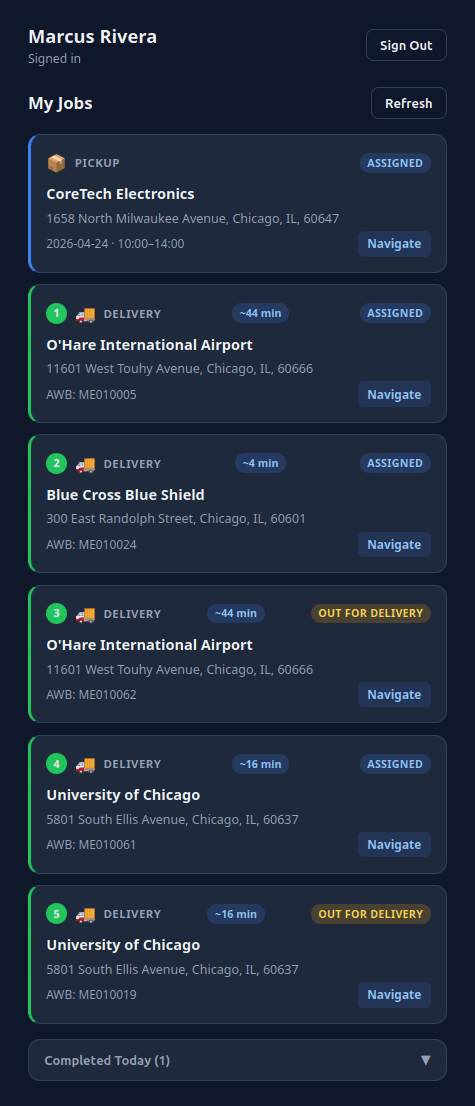
Drivers see only what's theirs - today's pickups, today's deliveries, the next stop on the map. Status colours and time windows make it obvious what's at risk and what comes next, without anyone having to call dispatch.

  • Today's queue - assigned pickups and deliveries grouped by service window.
  • Tap-to-open - one tap drills into the full job detail with address, contact, and notes.
  • Live status - the moment a scan or signature is captured, the row updates and dispatch sees it.
Driver app job list - assigned pickups and deliveries with status and map directions

First Login & Location Consent

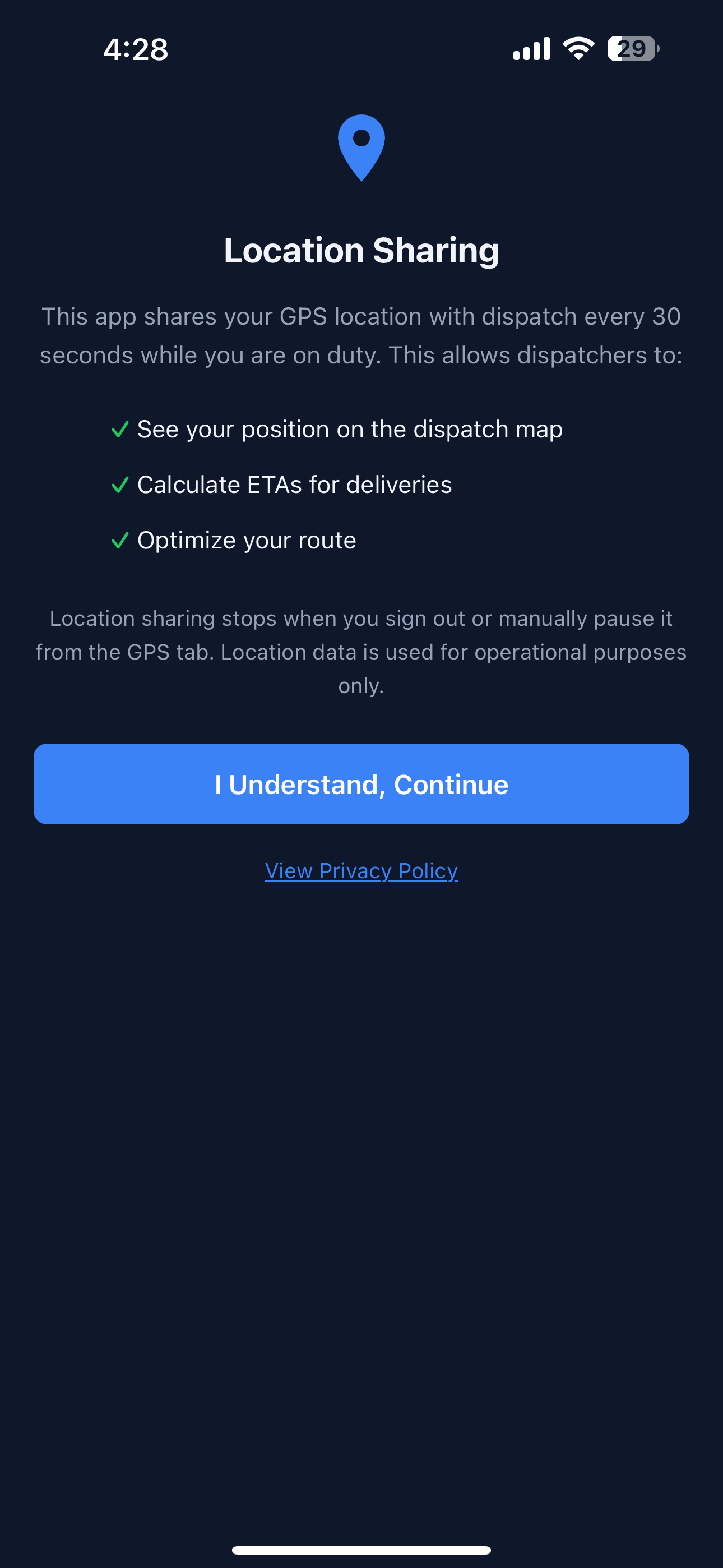
The first time a driver signs in, the app explains exactly what it shares and why - before asking for location permission. No dark patterns, no buried toggles.

  • Plain-language consent - drivers see the GPS interval, what dispatch sees, and how to pause it.
  • Driver-controlled pause - one tap from the GPS tab to stop sharing on a break or after shift.
  • Automatic stop on sign-out - location sharing ends the moment the driver logs out.
  • Operational use only - data feeds the dispatch map and ETAs; it isn't sold, profiled, or kept beyond what dispatch needs.
Location sharing consent screen explaining 30-second GPS interval, dispatch map, ETA calculation, and route optimization

Pickup Details & One-Tap Navigation

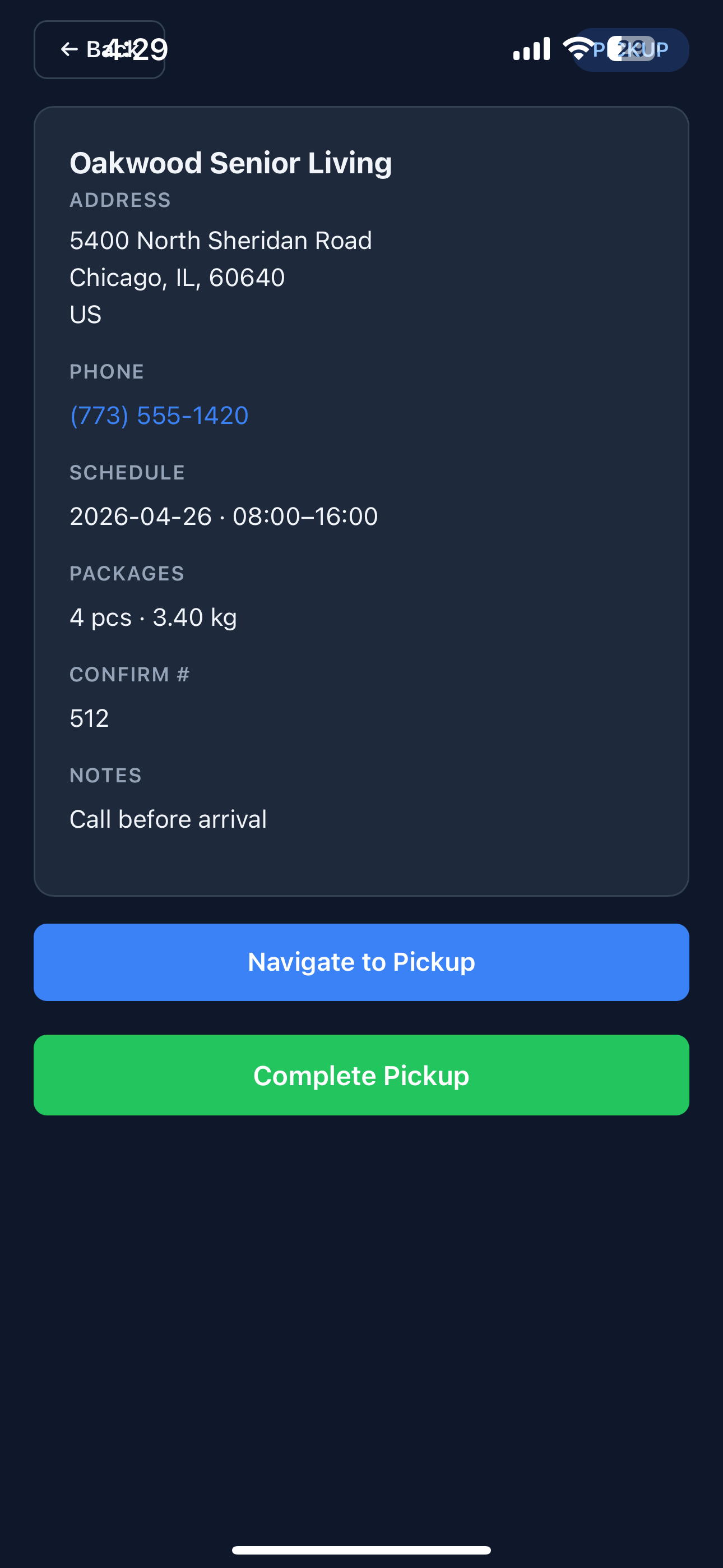
Tap a job and the driver gets everything they need to complete it without flipping between apps - the address, the contact phone (tap to call), the schedule window, the package count and weight, the confirmation number, and the dispatcher's notes.

  • Navigate to Pickup - launches the driver's preferred map app with the destination pre-filled.
  • Tap-to-call contact - phone numbers are live links; no copy-paste fumbling at the gate.
  • Notes from dispatch - "Call before arrival", "Buzz unit 3", "Dock receiver" - visible right where it matters.
Pickup details screen showing address, phone, schedule, package count, confirm number, and notes with Navigate to Pickup and Complete Pickup buttons

Scan Every Package, Every Handoff

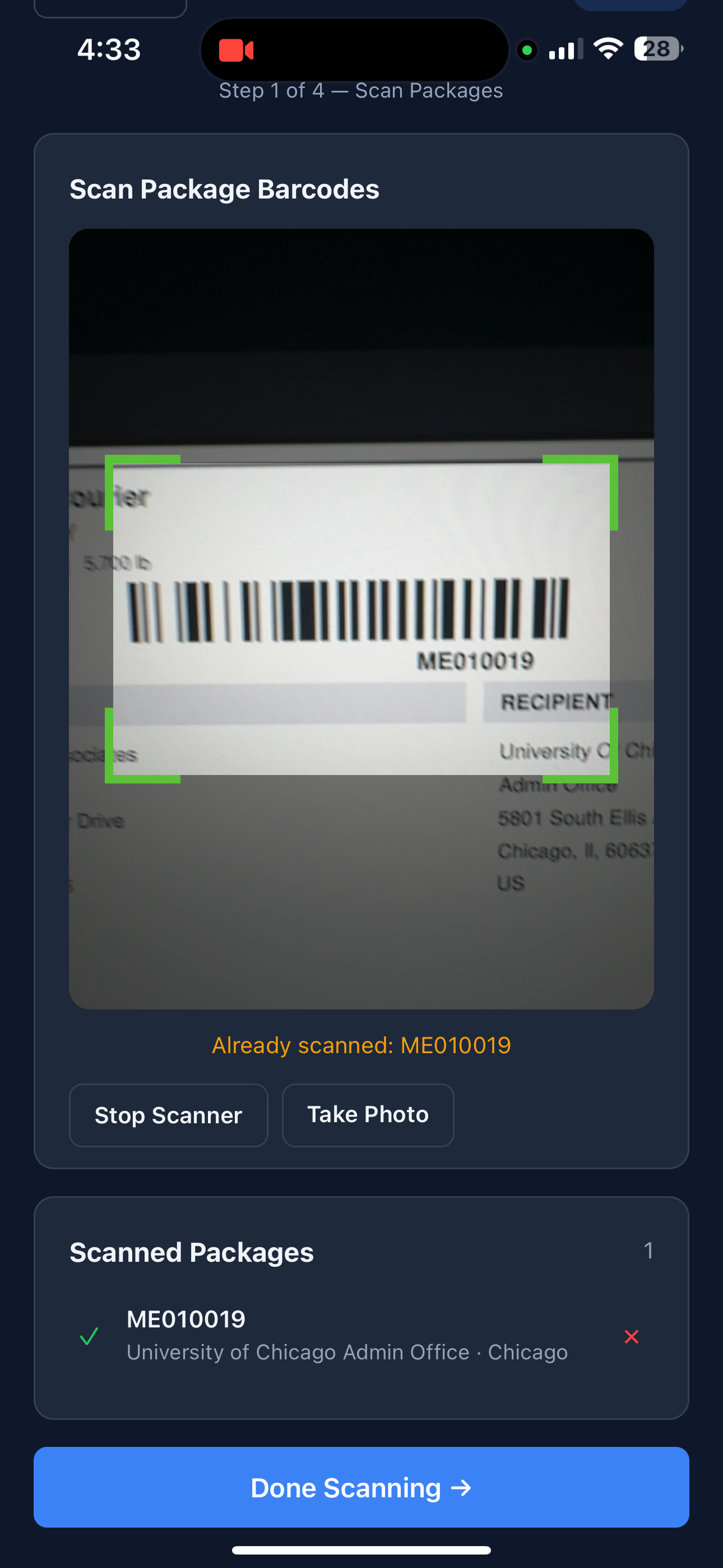
The phone's camera is the scanner. Drivers point, the app reads the barcode, and the package joins the pickup or delivery record - no separate scanner gun, no Bluetooth pairing, no hardware to lose.

  • Live duplicate detection - "Already scanned: ME010019" warns instantly so the same parcel isn't counted twice.
  • Take Photo fallback - if a label is damaged, the driver photographs it and dispatch resolves it later.
  • Running tally - scanned count and recipient address show on-screen so drivers can confirm at a glance.
  • Offline-tolerant - scans queue locally if signal drops; they sync the moment connectivity returns.
Scan Package Barcodes screen showing live camera viewfinder, barcode crosshair guides, scanned packages list, and Done Scanning button

Signature & Photo Capture

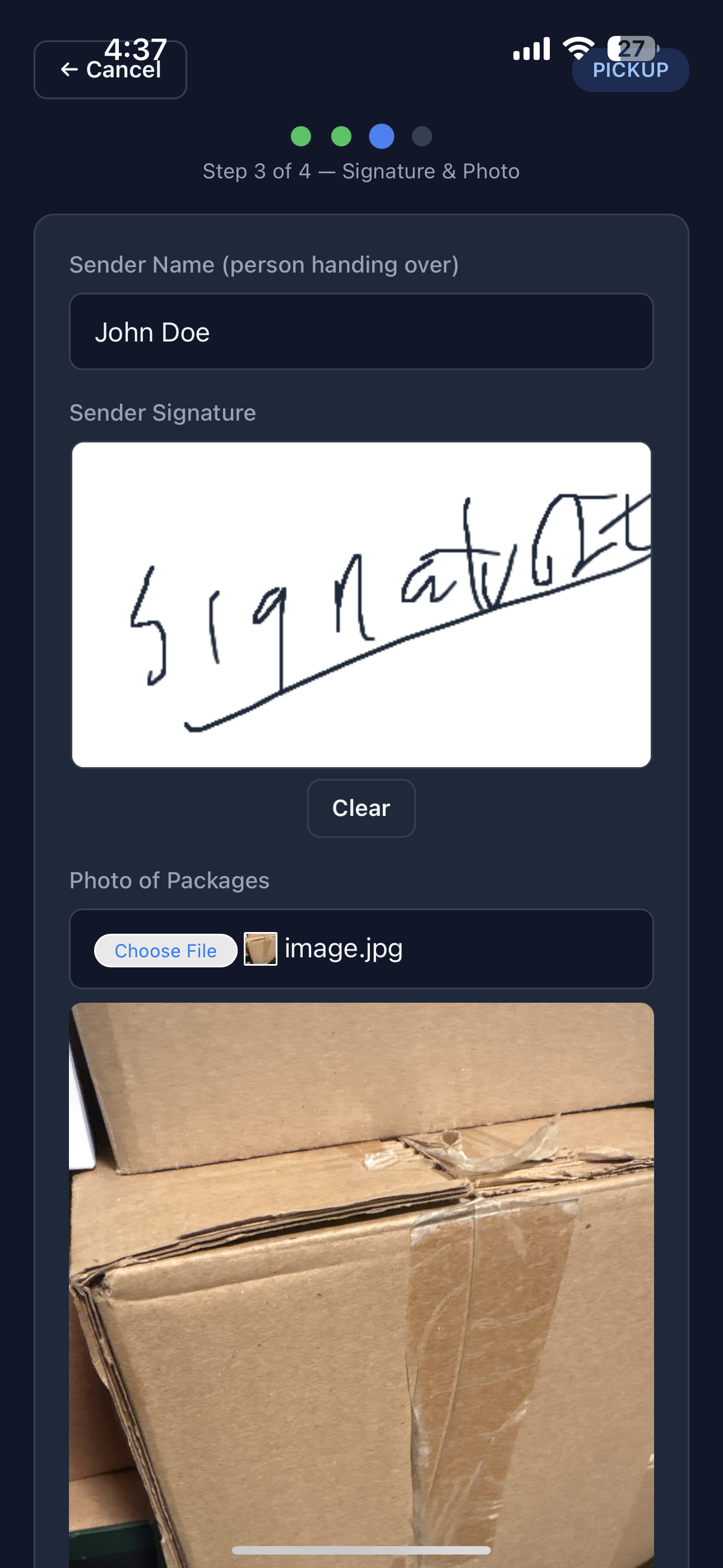
Once the parcels are scanned, the wizard asks for the sender's name, an on-glass signature, and a photo of the packages. Everything binds to the pickup record and is visible from dispatch within seconds.

  • On-glass signature - finger or stylus on the phone screen; one tap to clear and redo.
  • Package photo - useful when boxes are damaged on pickup or the driver wants to record what was handed over.
  • Sender name capture - whoever physically handed the parcel over, recorded against the shipment.
Pickup wizard step 3 of 4 with sender name field, signature pad, and package photo picker

Review Before Commit

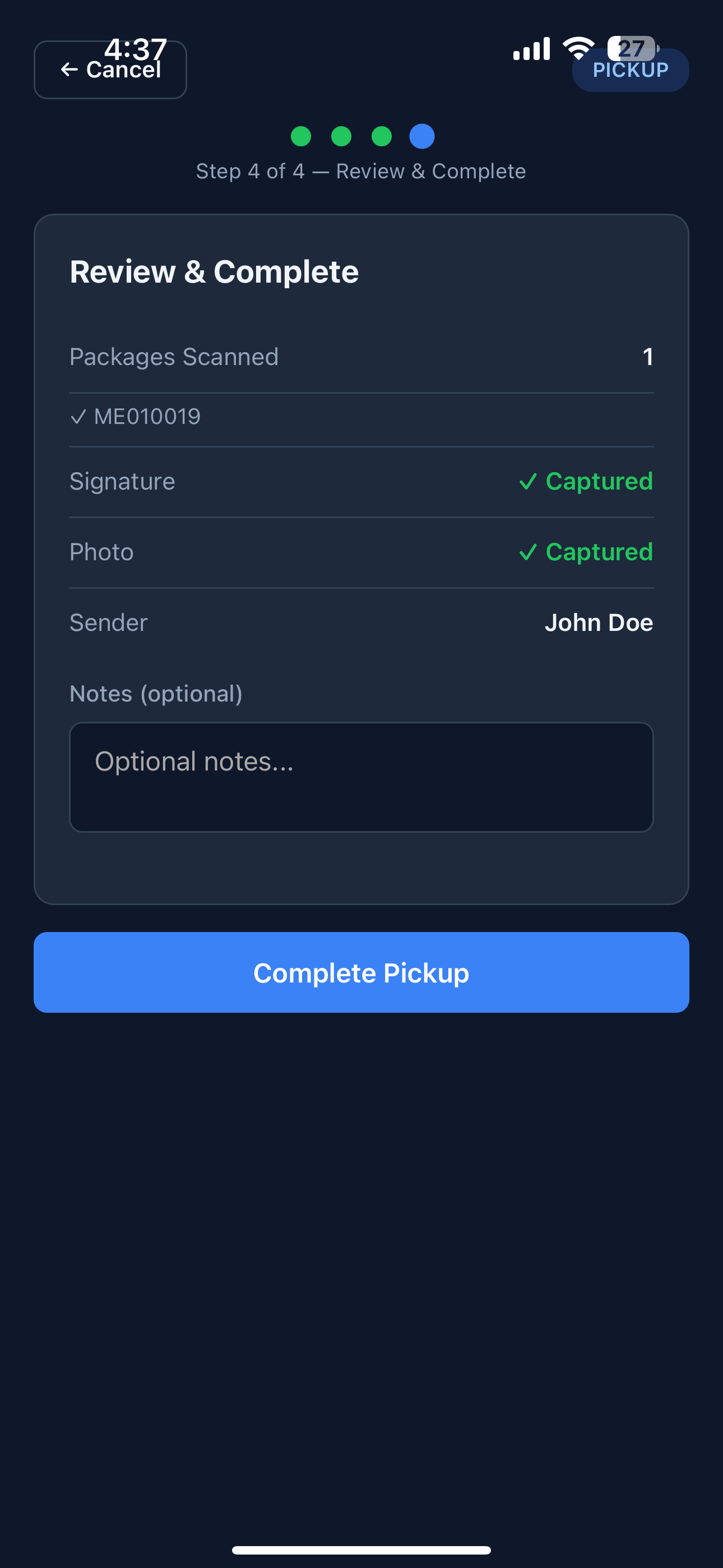
Step 4 of the pickup wizard. Drivers see exactly what's about to be submitted - scan count, signature captured, photo captured, sender on file, optional notes - and only then commit. Nothing posts to dispatch until the driver confirms.

  • Step indicator - clear progress dots at the top so drivers know exactly where they are in the flow.
  • Last-mile note field - any context the driver wants to add before completion.
  • One-tap Complete - submits the whole pickup atomically; no half-saved state.
Pickup wizard step 4 of 4 review screen showing packages scanned, signature captured, photo captured, sender, optional notes, and Complete Pickup button

Proof of Delivery & ID Verification

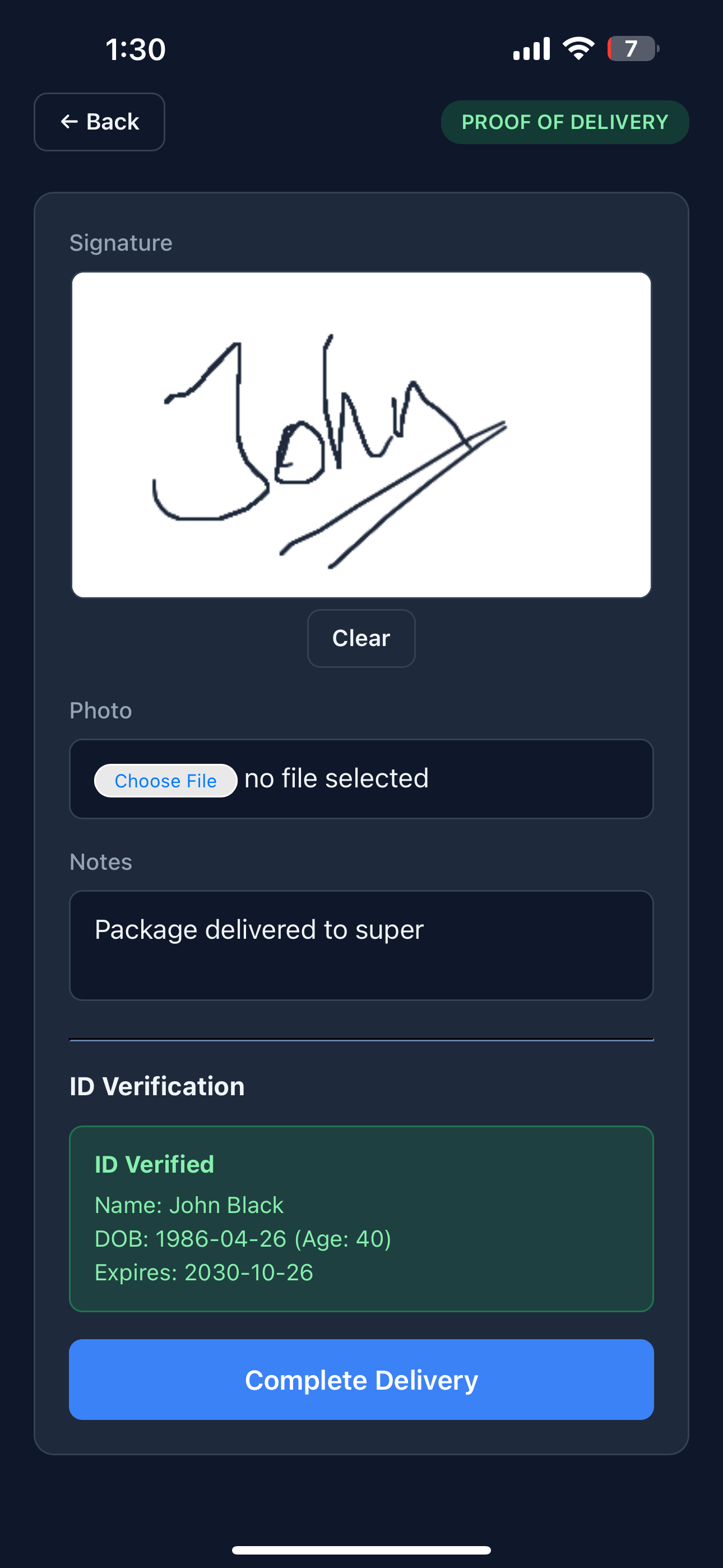
Delivery uses the same building blocks - signature, photo, notes - plus an optional ID scan for shipments that legally require an adult recipient: alcohol, cannabis, controlled goods, regulated B2B handoffs.

  • PDF417 barcode parsing - the driver scans the PDF417 barcode on the back of the driver's licence; the app extracts name, date of birth, age, and expiry on-device.
  • Age-gated workflows - shipments flagged as restricted won't let the driver complete delivery without a verified ID matching the recipient.
  • ID data stays operational - we capture the verification result and required fields, not a photograph of the licence.
  • Custom delivery notes - "Left with super", "Front desk - Mary", "Side door per request" - typed once, attached forever.
Proof of delivery screen with signature pad, photo upload, notes, and ID Verified panel showing parsed name, date of birth, age, and expiry

What's Behind It

Every screen above is wired into the same operational backbone the dispatcher and customer are looking at - that's why scans show up on the board and tracking page in seconds, not at end-of-day.

Frequently Asked Questions

Does the driver app work offline?

Yes. Scans, signatures, photos, and notes are stored on the device while offline and sync automatically the moment connectivity returns. Drivers don't have to do anything special - the queue handles itself.

Does it run on iPhone and Android?

Both. The app is a progressive web app that runs in any modern mobile browser - Safari on iOS, Chrome on Android. Drivers add it to their home screen and it behaves like a native app, with full-screen, camera, GPS, and push notification access.

Do drivers need to install anything from the App Store or Play Store?

No. There is no App Store or Play Store listing. Drivers open a link to your courier's domain, log in, and tap "Add to Home Screen" - that is the install. Updates roll out the moment you push them, with no review queues to wait through.

What kind of barcodes can the app scan?

Most 1D and 2D barcodes - Code 128, Code 39, EAN-13, QR, and PDF417. PDF417 is the format on the back of driver's licences in the US, Canada, Australia, and New Zealand, which is how the ID verification step extracts name, date of birth, age, and expiry on-device.

How is the driver's location data handled?

Location sharing only runs while the driver is signed in and after they consent on first login. The driver can pause or stop it from the GPS tab at any time, and signing out ends sharing immediately. Position data feeds the dispatch map and ETA calculations only - it isn't sold, profiled, or kept beyond operational need.

Related

Put It in Your Drivers' Hands

Start a free trial. Add a driver, send them the link, and watch their first scan appear on your dispatch board.

Start Free Trial