Dispatch is where orders turn into deliveries. Pickups land on a board, drivers get assigned, packages get scanned and sorted, manifests get printed, and customers get notified - all from one view, with the drivers' positions on a live map next to the job list.

Everything dispatchers do here flows automatically into tracking, billing, and the customer portal. There is no second system to update. The dispatch board is the system.

One Board, Every Channel

Pickups come in from many places. They all land on the same dispatch board, and from there a single click sends them out to the right driver, the customer, the warehouse, or a partner carrier.

How dispatch works: many input channels, one board, fan-out to drivers and notifications Orders arrive from the customer portal, operator entry, API, and scheduled pickups. They converge on the central dispatch board. From there, work fans out to drivers via the mobile app, to customers via email and SMS, and to the warehouse via manifests and scans. INCOMING WORK Customer portal self-scheduled pickup Operator entry phone-in / walk-in REST API customer's ERP / webshop CSV import bulk upload Recurring pickup scheduled rules Dispatch Board jobs · drivers · map assign · scan · manifest live FAN-OUT Driver mobile app push + map directions Customer notifications email · SMS Warehouse / scan manifest · drop sheets 3rd-party carrier FedEx / DHL / UPS API Webhooks to your other systems No second system to update. The dispatch board is the system.

The Live Dispatch Board

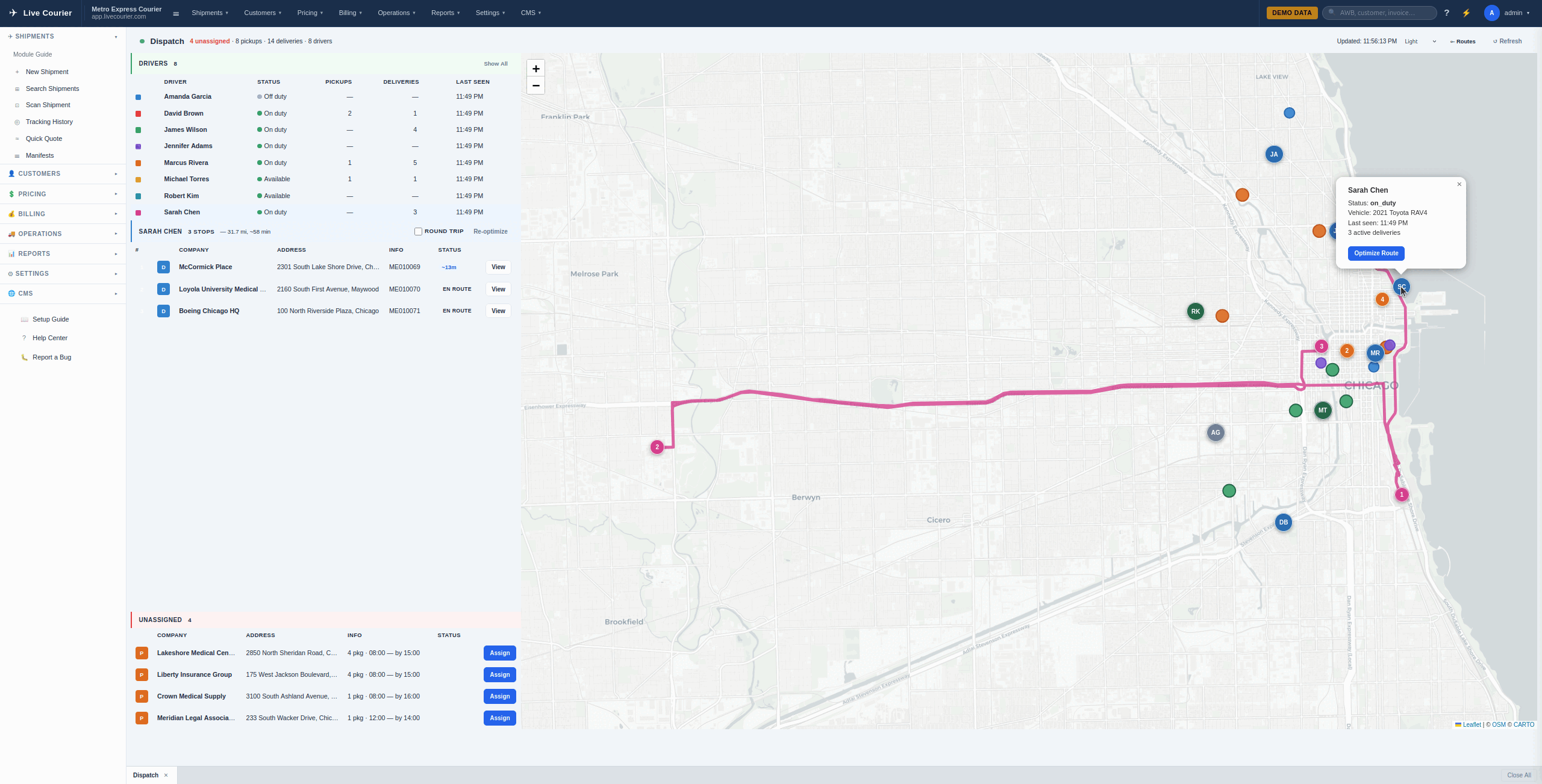
Drivers, jobs, and a map - on one screen, refreshing without a reload. Filter by status (assigned, picked up, in transit, delivered, cancelled), by driver, by zone, or by service level.

  • Driver list - current location, last scan, jobs in progress, jobs remaining.
  • Job queue - pickups and deliveries sorted by service window. Color-coded if anything is at risk.
  • Live map - drivers and stops plotted in real time. Click a marker to assign or reassign.
  • Drag & drop - move a job between drivers without opening a form.
LiveCourier dispatch board with driver list, job queue, and live map

Driver Assignment & Real-Time Tracking

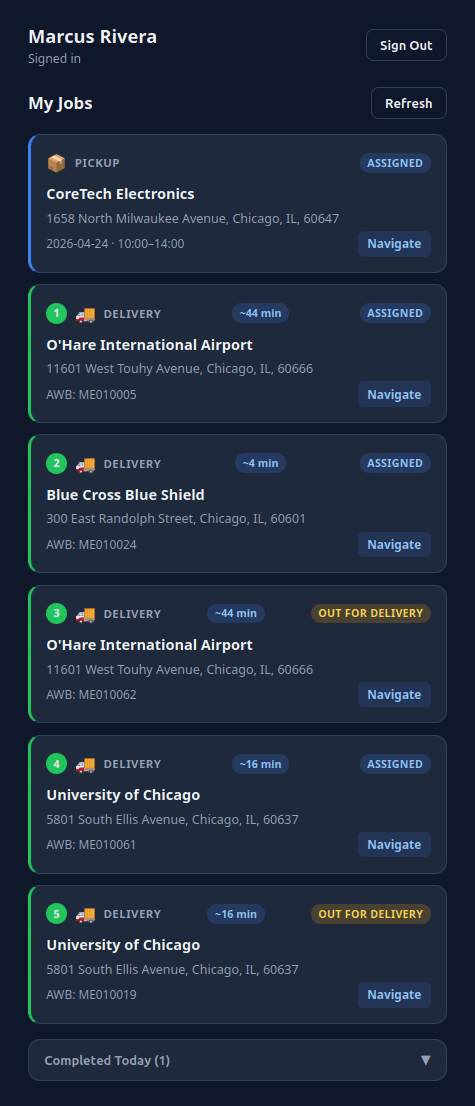
Once a job is assigned, it lands on the driver's phone immediately. Their position updates the dispatch map, and every scan they make on the road writes back to the same shipment record your customer is watching.

  1. Dispatcher assigns a job (or auto-assignment picks the closest available driver).
  2. Driver gets a push notification and the job appears in their queue with map directions.
  3. Driver scans on pickup; status flips to "Picked Up" everywhere - board, portal, customer email.
  4. Driver's GPS position streams to the dispatch map while they're on shift.
  5. On delivery, signature and POD photo are captured and attached to the shipment.

Out of coverage? Send the driver an SMS with a custom message - they don't need data to receive it.

Driver app showing assigned job, map directions, and scan button

Scanning, Sorting & Manifesting

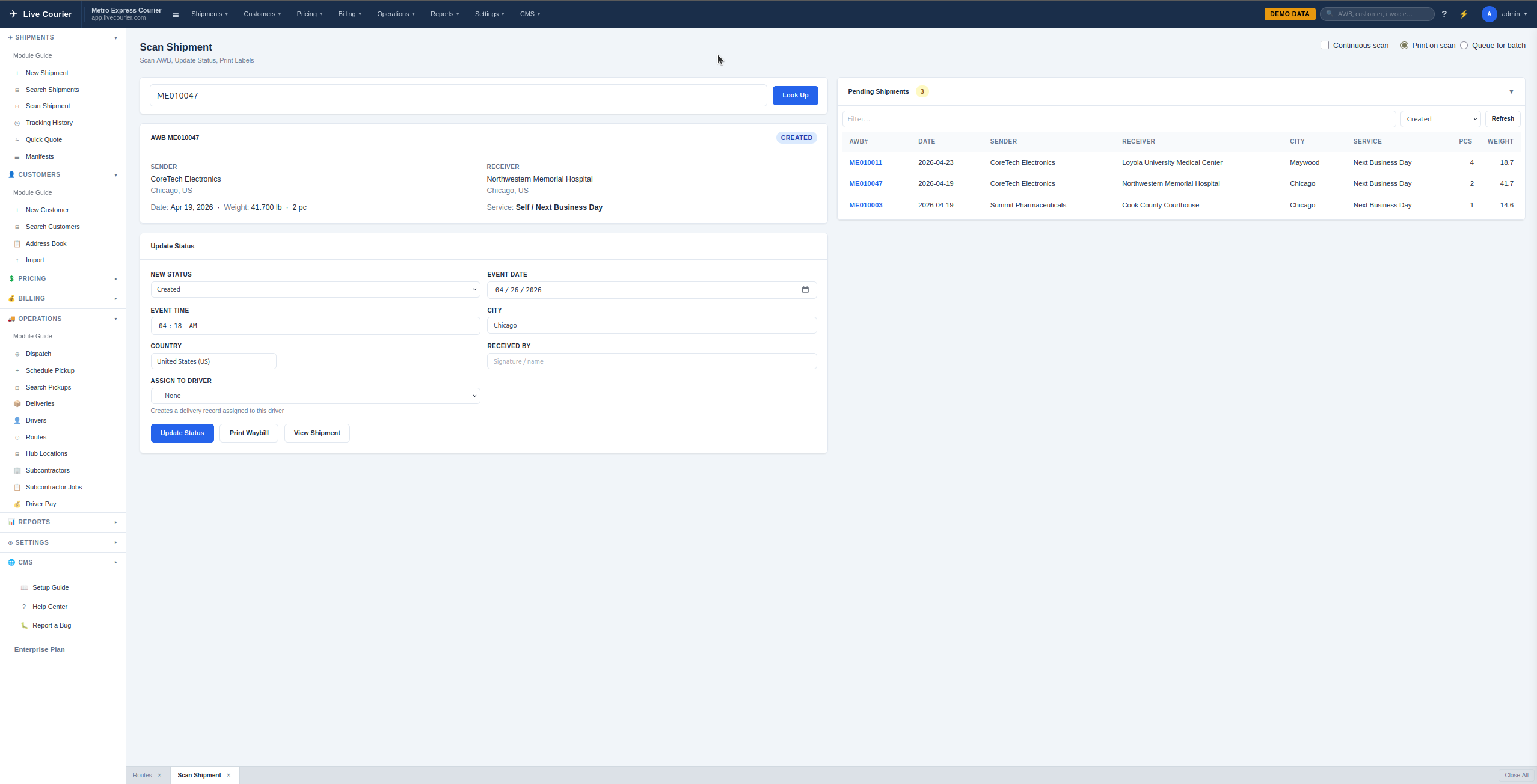
Every package gets a barcode. Every barcode gets scanned at every handoff. Manifests print themselves from the scan history - no separate data entry, no clipboard.

  • Pickup scan - driver app, the moment the package leaves the customer's hand.
  • Arrival / warehouse scan - at sorting. Print provider labels (FedEx, DHL, UPS) at this stage if the package is being forwarded.
  • Departure / route scan - when the package leaves with the delivery driver.
  • Delivery scan - final confirmation, with signature and POD.
  • Manifests - generated from any scan group: route manifest, driver manifest, partner-carrier handoff manifest.
Scan Shipment screen with AWB lookup, status update form, and pending shipments queue

What's Behind It

Six sub-modules wrapped into one operations view - none of which the dispatcher has to switch between.

Related

Run Your Operations from One Screen

Start a free trial and see what dispatch looks like when scans, assignments, and notifications all live in the same system.

Start Free Trial